
Eventbrite App
EventbriteEntertainment
4.932.58K Reviews
- Version
- 10.68.0
- Installs
- 10.00M
- Age Rating
- Everyone
Screenshots
Our Review of Eventbrite App
 Analysis by Appyee
I use Eventbrite when I want to find something to do without checking a dozen venue pages, social feeds, and local calendars. It is an entertainment app from Eventbrite that brings event discovery into one place, covering the practical part of going out as well as the initial search. My first impression is that it works best as a starting point: it helps turn a vague idea such as “something interesting this weekend” into a shortlist of real possibilities.
The app is free, available for Everyone, and supports devices running Android 8.0 or later. Its public reception is unusually strong, with a 4.9 average from around 280 thousand ratings and more than 10 million installs. Those figures do not replace personal testing, but they do explain why it feels like a familiar tool rather than a niche event directory. I reviewed it as an everyday discovery app, paying particular attention to how quickly it gets me from opening the app to making a useful decision.
Finding an event without wasting the evening
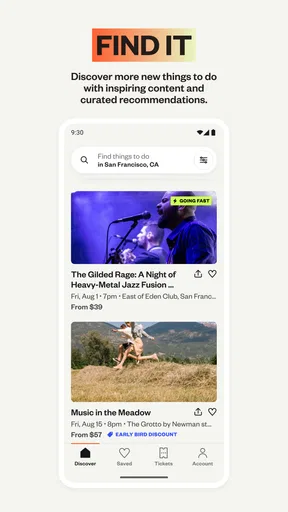
The main strength is the way Eventbrite gives structure to an open-ended search. Instead of beginning with a specific organizer or venue, I can approach it by mood, timing, and location. That makes it useful when I know I want to leave the house but have no fixed plan. A search for a workshop, talk, class, performance, or social activity feels more productive than scrolling through general entertainment posts because each result is presented as something I can investigate and potentially attend.
I also like that the app suits two different mindsets. If I already know the event I want, it can act as a direct route to the listing. If I only know that I want a new experience, browsing can help me discover options I would not have found through a normal search engine. That distinction matters: a search engine is often better for locating one famous venue, while Eventbrite is more useful for comparing several organized activities in one session.
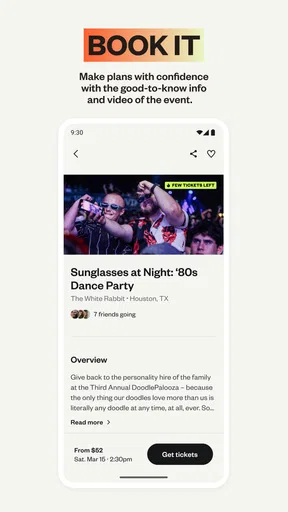
Event pages are most valuable when I read them as planning documents rather than attractive invitations. I look at the date, location, description, and booking details before becoming interested in the presentation. This habit prevents a common mistake with event apps: saving something because it looks appealing, then discovering later that the timing or format does not fit. My practical tip is to judge an event by its logistics first and its promotional wording second.
What the app feels like during normal browsing
In ordinary use, the experience feels focused on quick decisions. I do not expect a long loading sequence every time I move between discovery and details, and the current version, 10.68.0, gives the app a contemporary feel on a compatible phone. I would not call every interaction instant, because event discovery naturally depends on changing listings and location-related results, but the overall workflow is easy to understand: browse, narrow the choice, inspect the details, and decide whether it deserves a place in my plans.
That simple flow is important for casual users. Someone opening the app on a lunch break does not want to learn a complicated catalog system. Eventbrite is strongest when I have only a few minutes to look for an activity. It can also be useful while traveling, when I want to see what is happening nearby without already knowing the local entertainment scene.
There is a trade-off in keeping the browsing experience broad. A large selection can feel less personal than a recommendation from a friend, and not every result will match my taste. I sometimes need to inspect several listings before finding one with the right combination of time, distance, and subject. That is not a failure of the app so much as the cost of using a wide event marketplace instead of a small, carefully curated newsletter.
Handling a busy search session
The heavier moments arrive when I am comparing many possibilities at once. For example, I might search for a Saturday activity, open several listings, return to the results, adjust the timing, and then check another location. This is where an event app earns its place: the value is not in viewing one page, but in reducing the effort of comparison.
My advice is to use a short mental checklist while browsing. I first remove events that are too far away, then eliminate those with unsuitable times, and only after that compare the subject and atmosphere. This workflow keeps the app from becoming an endless scroll. It also exposes a limitation: Eventbrite can show me possibilities, but I still need to make the final judgment about whether an event suits my schedule, travel tolerance, and expectations.
When I am planning with another person, the app works better if we agree on the basic constraints before opening it. “Find something fun” is too vague and can lead to many attractive but unusable results. “Something indoors, close by, and available on Saturday afternoon” produces a much more manageable search. That is a small change, but it makes Eventbrite feel considerably faster because I am asking it a clearer question.
Another useful habit is to check the event details again immediately before committing to the plan. Event information is the part most likely to affect the real-world experience: start time, venue, format, and any instructions from the organizer. I treat the discovery screen as a place to find candidates, not as a substitute for reading the complete listing. This is especially important when the event is unfamiliar or when I am arranging it for someone else.
Reliability in real planning
Reliability here means more than whether the app opens. It means whether I can trust the app to support a plan from the first search to the moment I leave home. Eventbrite is dependable as a discovery and event-information tool, but I still keep the final details visible before heading out. That is sensible with any changing schedule, particularly when the event matters enough to involve travel or coordination with friends.
The app’s long presence in the market helps it feel established. It was released on January 25, 2012, and the developer is Eventbrite, the same name most users associate with the service. The combination of a long-running product and a large user base makes it easier for me to treat the app as a regular planning utility rather than a one-time download.
Recovery is also part of reliability. If I lose focus while browsing, my best approach is not to assume that every previous choice will remain obvious. I return to the event listing, confirm the essentials, and continue from there. This is a useful mindset for any app that connects digital browsing with a fixed real-world appointment. Eventbrite reduces the search work, but I remain responsible for checking the plan before relying on it.
I would be cautious about using it as my only source for a highly time-sensitive outing. If I am traveling a long distance, meeting a group, or attending something with limited flexibility, I use the listing as the starting point and verify the practical details again. That is not a criticism unique to Eventbrite; it is the correct level of caution whenever event information can change after I first discover it.
How it behaves on different phones
Because the minimum operating system is Android 8.0, the app is accessible to people who are not using the newest phone. That is helpful for an entertainment tool, since many users will want to browse casually on an older spare device or a phone that still works perfectly for everyday tasks. I would still keep reasonable expectations: an older handset may feel less fluid when switching between several pages than a newer one, even when the software is supported.
Eventbrite does not need to be treated like a demanding game or a professional editing suite. Its workload is mainly browsing and handling event information, so my experience is that the important performance question is responsiveness during repeated searches rather than sustained heavy processing. If the phone is already crowded with background activity or short on storage, any app can feel less comfortable. Closing unnecessary apps and keeping the operating system in good condition is more useful than expecting Eventbrite to solve device-wide slowdowns.
Resource-conscious users should also think about how they browse. Repeatedly opening every result is less efficient than narrowing the search first. I get a better experience by deciding on location and timing, scanning the shortlist, and opening only the listings that genuinely fit. This saves attention as well as device resources, and it makes the app feel calmer during a busy planning session.
For someone with limited data or an unreliable connection, I would plan the important part of the search before leaving home. Event discovery is much more comfortable when I have time to read full descriptions and compare options rather than trying to make a decision while moving between weak connections. I do not consider this a special flaw in Eventbrite; it is simply a practical constraint for an app whose usefulness depends on current event information.
Who will get the most from Eventbrite
I recommend it most strongly to people who enjoy trying new activities but do not have a reliable way to hear about them. It is also a good fit for newcomers to a city, occasional concert or workshop visitors, and anyone planning a weekend with friends. The app is particularly helpful when the group has not chosen a venue yet and needs a shared pool of realistic options rather than a single recommendation.
It can also help organizers’ audiences, even when the user is not involved in event planning. A person who receives an event name can use the app to understand what it is, where it takes place, and whether it fits the schedule. That makes the service useful at both ends of the decision: discovery for the curious and confirmation for someone who already has an invitation or suggestion.
On the other hand, I would skip it if I only want a very narrow local guide curated by people with a specific taste. A specialist venue calendar may be better for someone who already knows the exact theater, club, museum, or community group they follow. Eventbrite’s breadth is its advantage, but that same breadth means I may need to filter more actively than I would with a focused source.
I would also avoid relying on it as a replacement for personal planning. It can help me find an event, but it cannot decide whether the journey is sensible, whether my friends will enjoy the format, or whether the timing works with the rest of the day. The best results come when I use it as a discovery and comparison layer, then apply my own judgment.
A realistic weekend workflow
Imagine I have a free Saturday and want to do something different with a friend. I open the app with three limits in mind: a manageable distance, an afternoon start, and an activity that gives us something to talk about afterward. I browse the relevant options, remove anything that conflicts with those limits, and read the remaining descriptions carefully. Instead of sending my friend a long stream of links, I send two or three choices with a short note explaining why each one fits.
Once we choose, I revisit the listing and write down the practical information we will need. I then put the time into my calendar and decide how we will get there. This workflow shows where Eventbrite helps most: it shortens the path from uncertainty to a small, usable set of plans. It does not remove the social conversation or the travel arrangements, but it gives that conversation something concrete to work with.
For a last-minute evening, I use a different approach. I search by the nearest reasonable area and focus on events that can fit the remaining time. I avoid reading every description in full and first identify the listings that are logistically possible. This is where the app’s speed feels most valuable—not because it guarantees an instant answer, but because it lets me move quickly from a broad idea to a practical shortlist.
Value, maturity, and everyday friction
Being free makes Eventbrite easy to try, especially for users who are unsure whether event discovery will become part of their routine. The value is not just saving money on an app; it is saving the effort of searching across disconnected sources. If I use it only once to find a suitable activity, it has still served a clear purpose. If I browse regularly, its usefulness grows because I become better at recognizing which listings deserve a closer look.
The main friction is decision overload. A wide event catalog can tempt me to keep searching after I already have a good option. I have found that setting a stopping rule helps: once I have a few events that meet the time, distance, and interest requirements, I choose among them instead of continuing indefinitely. This is a small but important distinction between discovering possibilities and actually making plans.
I also prefer to read beyond the first appealing lines of a listing. Promotional language can create an impression quickly, while the details determine whether the event is right for me. Checking the full description, venue, and schedule before making a commitment is the most reliable way to avoid disappointment. Eventbrite makes that information accessible, but it does not remove the need to read it.
My performance verdict
After using Eventbrite as a regular entertainment discovery tool, I see it as a practical middle ground between a general web search and a tightly curated local guide. It feels quick enough for spontaneous browsing, stable enough to support ordinary planning, and light enough in purpose that it should not be confused with a resource-heavy app. The strongest performance impression comes from the workflow: search, compare, inspect, and decide without unnecessary complexity.
Its limitations are mostly about the nature of event discovery rather than dramatic technical problems. Results still require judgment, busy searches can become overwhelming, and important plans deserve a final check before departure. Users with older devices or inconsistent connections should browse thoughtfully and avoid leaving every decision until the last minute. Those are fair trade-offs for a broad catalog that serves many kinds of activities.
My final recommendation is simple: install Eventbrite if you want more ideas for what to do and prefer one organized place to begin looking. I would choose a specialist calendar when I already know the exact local scene I want, but for open-ended plans, unfamiliar cities, and weekends that need a little inspiration, Eventbrite is a useful companion. It does not plan my life for me, and that is precisely why I find it practical: it gives me better options, then leaves the final choice in my hands.
Verdict
Strengths of Eventbrite App
- Discover local events using date, location, and category filters.
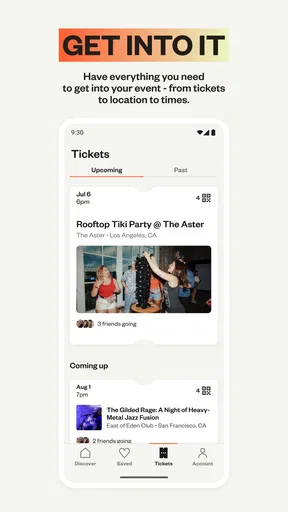
- Mobile tickets are easy to access and present at the venue.
- Event details include schedules, maps, prices, and organizer information.
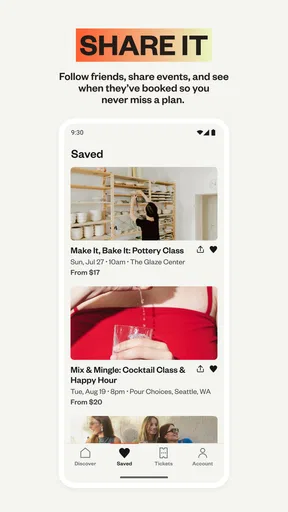
- You can save interesting events and receive reminders before they start.
- Some events offer quick in-app registration and secure payment options.
Limitations of Eventbrite App
- Ticket fees can significantly increase the final purchase price.
- Event quality and accuracy depend heavily on individual organizers.
- Refund policies vary and may be difficult to understand before buying.
- The app may send frequent notifications about suggested events.
- Some listings have limited details, photos, or accessibility information.
Similar Picks in This Category
View All
Google Play Games
Google LLC3.9

Netflix
Netflix, Inc.4.8

YouTube Kids
Google LLC4.2

Disney+
Disney4.4

Prime Video
Amazon Mobile LLC4.7

Steam
Valve Corporation3.2
Frequently Asked Questions
What is the Eventbrite app used for?
Eventbrite is an event discovery and ticketing app that helps you find activities happening near you or in other locations. You can browse concerts, festivals, classes, conferences, workshops, nightlife, and community events. From the app, you can read event details, check dates and venues, view ticket options, register, and keep your purchased tickets available on your phone.
Is the Eventbrite app free to download and use?
The Eventbrite app is generally free to download on Android and iOS, and creating an account or browsing events does not usually cost anything. However, individual events may charge admission, registration, booking, or service fees. The final price depends on the organizer, ticket type, and location, so it is important to review the complete order summary before confirming a purchase.
How do I buy and access tickets through Eventbrite?
After selecting an event, you can choose an available ticket or registration option and complete payment when required. Once the order is confirmed, Eventbrite normally sends a confirmation by email and stores the ticket in the app under your tickets or orders section. At the entrance, the organizer may scan the digital QR code, so keeping the ticket accessible offline or with a reliable internet connection is recommended.
Can I cancel an Eventbrite ticket or request a refund?
Refunds and cancellations are not controlled by the app in the same way for every event. Each organizer sets the refund policy, which may depend on the ticket type, event date, and cancellation deadline. You can review the event’s refund terms and contact the organizer through Eventbrite if necessary. Some tickets may be non-refundable, while others may allow transfers or refunds under specific conditions.
Does Eventbrite require an account, and is it safe to use?
You can often browse events without signing in, but an Eventbrite account makes it easier to purchase tickets, manage registrations, receive updates, and access your order history across devices. The app uses standard account and payment security measures, but you should still download it from the official app store, verify event details carefully, and avoid sharing login information or purchasing through suspicious links claiming to represent an organizer.
